No SPF Record Found? Causes, Fixes, and Best Practices


“No SPF Record Found” means the lookup didn't find an SPF TXT record at the domain name being checked. First confirm that this is the domain your mail uses as its Return-Path. If the record is genuinely missing, publish one SPF record for the services you actually send through. A second record, a syntax error and a DNS failure are different problems with different fixes.
DMARKOFF's free SPF Checker runs the lookup for you. Enter the domain from the message's Return-Path, which can differ from the domain in the From address.
Key Takeaways
- No record gives the result
none. Two records or a syntax error givepermerror, and a failed DNS query givestemperror. - Check the right name. SPF applies to the MAIL FROM (Return-Path) domain, and subdomains don't inherit the parent's record.
- A visible record isn't proof. Send a real message from each service and look for
spf=passon the domain you expect. - No SPF doesn't always mean refused. DMARC can still pass through an aligned DKIM signature. Without one, under
p=reject, most receivers in our test refused or bounced the mail.
What Does “No SPF Record Found” Mean?
The lookup asked for the TXT records at one name and found none that start with v=spf1. The standard treats that differently from a record that exists but doesn't work (RFC 7208 §4.4 to §4.6):
If a checker shows one message for all of these, that's how its interface works, not what the standard says. Two cases can surprise you. A name that doesn't exist at all (NXDOMAIN) also gets none. So does a record with a typo in its version tag, such as v=spf10: receivers discard anything that doesn't begin with exactly v=spf1, so it reads as no record at all. A syntax error in a recognized SPF record returns permerror, though some typos don't count: ip4= instead of ip4: reads as an unknown modifier, which receivers ignore (§6), so the check continues without that term.
How to Check Whether the Record Is Really Missing
Start with the right name. SPF is checked against the domain in the SMTP MAIL FROM, also called the Return-Path or envelope sender, and shown as smtp.mailfrom in a delivered message's Authentication-Results header. Many sending services use their own bounce domain or a subdomain of yours, so it's often not the domain in the From address. SPF also isn't inherited: a record on example.com doesn't cover mail.example.com.
Then query that name:
dig TXT example.com
On Windows, where dig usually isn't installed, nslookup returns the same records and reports any failure as an error message:
nslookup -type=TXT example.com
In dig's output, read the status field before anything else:
NOERRORwith a line that starts withv=spf1: a record exists. More than one such line means two records.NOERRORwith nov=spf1line, orNXDOMAIN: there's no SPF record at this name.SERVFAIL,REFUSEDor a timeout: DNS failed, so this says nothing about SPF yet.dig +shortprints nothing in these cases too, so empty output isn't proof of a missing record.
A record that's found looks like this. The quotes are how dig prints a TXT value:
example.com. 3600 IN TXT "v=spf1 include:_spf.google.com ~all"
The checker runs the same lookup and, when it finds a record, also checks its syntax and lookup count.
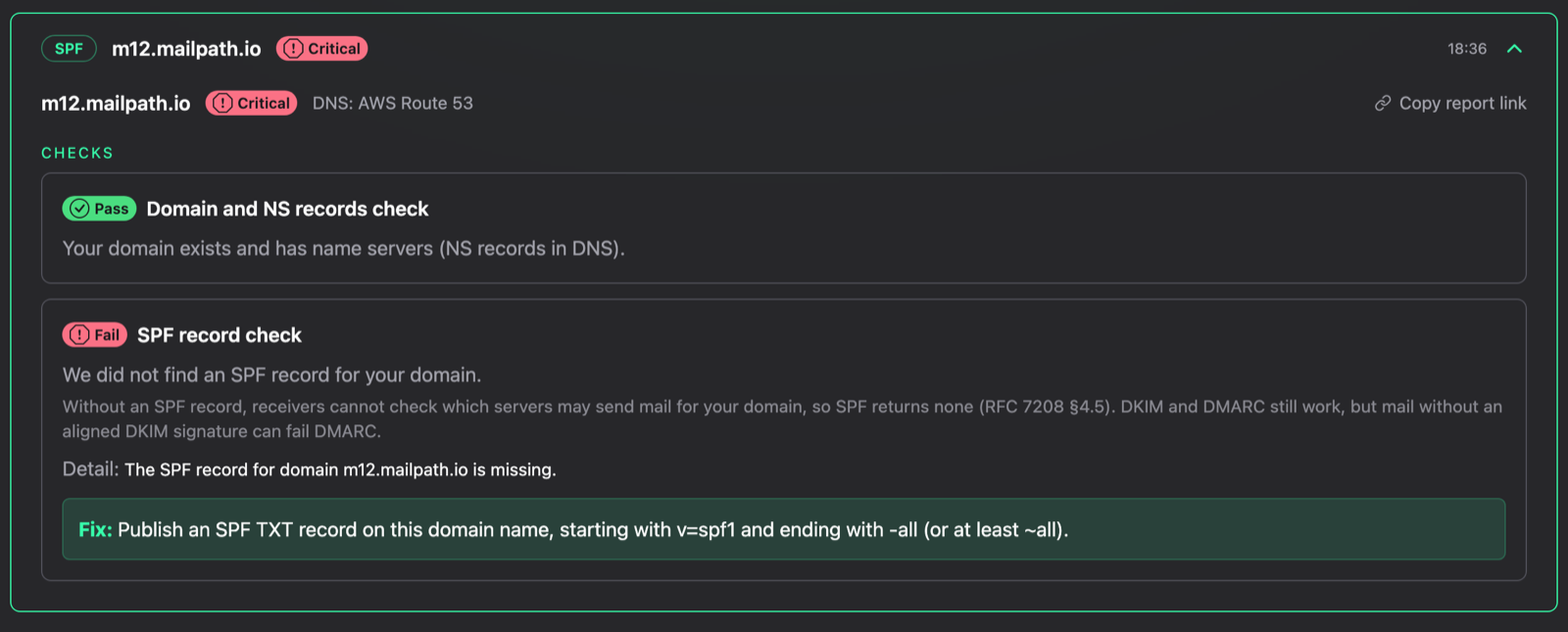
The SPF Checker on one of our test domains, which has no SPF record. Fail marks the checker's own test, not an SPF fail: the SPF result here is none.
Enter your Return-Path domain to see the same check for your own record.
How to Fix “No SPF Record Found”
If the check found a record, edit that one instead of adding another: a second record turns the result into permerror. If it's genuinely missing, work through these steps.
Step 1: List Your Senders and Their MAIL FROM Domains
List every service that sends mail with your domain: your mailbox provider, marketing and transactional platforms, CRM, support desk, billing, website forms and internal servers. Then find the MAIL FROM domain each one uses, because that decides where the record goes. An include: on your root domain does nothing for a service that sends from another name.
Step 2: Build One Record
A basic SPF record starts with v=spf1, lists the authorized senders, and usually ends with ~all or -all. The examples below use that form. If Google Workspace is your only sender on this name, Google's guide gives this record:
v=spf1 include:_spf.google.com ~all
If Microsoft 365 is your only sender, Microsoft's guide gives this one, with a different include for its government and 21Vianet clouds:
v=spf1 include:spf.protection.outlook.com -all
Add Microsoft's include only if your mail goes out through Microsoft 365, not because your recipients use Outlook. Any other service adds its own include: or ip4: term from its documentation, in the same record.
The two examples end differently because the vendors do: Google's uses ~all, and Microsoft recommends -all. Our comparison explains what each ending does. Each include: also costs at least one DNS lookup, and SPF allows 10 per evaluation, so check the total as you add services.
Step 3: Publish It as a TXT Record
Create the record at the company that hosts your DNS:
Three panel details to watch:
- The name field. Some panels use
@for the root domain, others want it empty. Entering the full domain where the panel appends it createsexample.com.example.com. - The record type. SPF is published as TXT only (RFC 7208 §3.1). If your panel offers a type called SPF, don't use it.
- Quotes. Some panels add them and some expect them, so follow yours, then look at the result in
dig. One pair around the value is normal. If the saved value includes a literal quote beforev=spf1, whichdigshows as\", the receiver won't recognize it as SPF. Several quoted strings on one TXT record are different: they're joined into one value.
Step 4: Verify With Real Mail
Run the SPF Checker or dig again. That only proves the record exists, so also send a real message from each service to a mailbox you can read, and open its headers:
spf=passappears inAuthentication-Results;smtp.mailfromshows the domain you expected;- if you rely on SPF for DMARC, that domain aligns with the From address.
Why the Checker Still Can't Find Your Record
Waiting is the last thing to try. Check these first:
- Is it the right name? Compare the name you queried with the message's MAIL FROM domain.
- Did you edit the zone that's in use? Your registrar and your DNS host can be different companies.
dig NS example.com +shortshows the name servers, and the record belongs with whoever runs them. - Do all of those servers return the record? Query each one directly and compare the answers, for example with
dig TXT example.com @ns1.your-dns-host.example. - Is it a TXT record at the exact name? If the panel appended your domain, the record is at
example.com.example.com. - What do resolvers say? Compare with
dig TXT example.com @8.8.8.8and read thestatus. A record that the authoritative server returns can still fail to resolve elsewhere because of a delegation or DNSSEC problem.
If every authoritative server returns the record, and a resolver still shows nothing with a clean status, it's probably caching. For a record you've just added, the resolver may have cached the earlier answer that no record exists. How long it keeps that answer depends on the zone's SOA record (the lower of its TTL and its MINIMUM field), not on the TTL of your new record (RFC 2308 §5). dig SOA example.com shows both values.
Record Found, but SPF Still Fails
A record that exists can still break. These cases get a different result from a missing one, and adding another record makes them worse.
Two SPF Records
This often happens when each service's setup guide tells you to add its own record. Two records are a permerror even when each one is correct (RFC 7208 §4.5), so merge them:
Before
v=spf1 include:_spf.google.com ~all
v=spf1 include:spf.protection.outlook.com ~all

After
v=spf1 include:_spf.google.com include:spf.protection.outlook.com ~all
Syntax Errors and Broken Includes
An SPF permerror means the receiver couldn't complete the check because of what's published. A syntax error anywhere in the record causes it before any sender is evaluated. So does going past 10 DNS lookups or reaching an include with no SPF record behind it, for the senders whose evaluation gets that far. Treat it as a configuration problem, not a normal fail.
SPF Fail, Softfail and Neutral
In simple records that end in -all, ~all or ?all, these results mean the record was read and no earlier term matched the sending IP. fail comes from -all and softfail from ~all, and for legitimate mail the usual cause is a service missing from the record. Softfail vs hardfail covers the difference. neutral comes from ?all and says nothing either way, so it's rarely what you want.
What a Missing SPF Record Does to Delivery and DMARC
SPF lets a domain list the servers allowed to send its mail, which gives receivers one way to spot spoofed messages. With no record the result is none, which leaves the receiver with no information either way. That isn't a refusal by itself, so what happens depends on the receiver's own rules and on DKIM and DMARC. DMARC can still pass through an aligned DKIM signature, which can keep a missing record out of sight for a long time. For mail to personal Gmail accounts, Google requires SPF or DKIM from all senders, and SPF, DKIM and DMARC from bulk senders: those sending close to 5,000 messages or more to personal Gmail accounts within 24 hours, with subdomains counted together with their primary domain.
We tested the harder case in October 2026: a subdomain with no SPF record, DMARC p=reject and no aligned DKIM signature, sent once through Mailgun to 44 seed mailboxes (test accounts at real providers). The seed mailboxes came from GlockApps, which is made by the same team as DMARKOFF. Here's what the receivers did:
- Refused during the SMTP session, most citing DMARC: Gmail and Google Workspace (
550 5.7.26), Yahoo and AOL (554 5.7.9), Outlook.com and Hotmail (550 5.7.509), Apple, GMX and most others. - Accepted, then bounced: three seed mailboxes that receive through Microsoft 365 (a plain Microsoft 365 seed, an EOP filter seed and a Proofpoint filter seed).
- Deferred: Interia replied
451 4.4.0 … Deferred due to SPF unsafeuntil Mailgun gave up after eight hours. - Accepted, never seen again: Seznam, Naver and Amazon WorkMail, with no bounce, and the message never appeared in the seed mailbox (we checked until 25 October).
- Delivered: T-Online and Vodafone delivered to the inbox mail that failed DMARC under
p=reject. Freenet, Libero, Virgilio, Proton and ukr.net put it in spam.
The control in the same run, with the same setup and a valid SPF record, wasn't refused by anyone. All 11 reporters that sent us aggregate reports for this case recorded SPF as none under auth_results/spf/result. Don't read that label as proof on its own, though: one reporter also recorded none for a record with an includes: typo, so confirm with a lookup.
These results describe that setup, with one message per seed mailbox, not every message without SPF. The study has the method and every receiver, and the raw data is in dmarcoff/articles on GitHub, under results/g1, case m12.
Use DMARC to Understand Your Sending Infrastructure
One of the most difficult parts of configuring SPF is identifying every service sending email for your domain. DMARC aggregate reports make this easier, because they show which infrastructure is sending mail with your domain and how it does on SPF and DKIM.
DMARKOFF collects and organizes these reports, so you can find legitimate senders, authentication failures and unexpected sources before moving toward stricter DMARC enforcement.
SPF Best Practices
Once the record works, these keep it working:
- Keep one record per name. Merge new services into it instead of adding another.
- Remove services you no longer use. Old includes authorize systems you've stopped using and add lookups. If a vendor retires its SPF host, an old include can also break the record.
- Recount lookups whenever you add a service, since a vendor can add lookups inside its own include.
- Check each sending subdomain separately. A record on the root domain doesn't cover them.
- Use SPF with DKIM and DMARC. Here's how the three work together. An SPF pass counts for DMARC only when its domain aligns with the From address, and that's a common reason DMARC fails.
FAQ
First confirm you're checking the domain in the message's Return-Path. If no record exists there, list the services that send with that domain and publish one SPF TXT record at that name. Then check it again and send a real message from each service to confirm spf=pass.
Usually the record is at a different name from the one being checked, or in a DNS zone that isn't the one in use. Check the name, then query each of the domain's authoritative name servers directly. If they all return the record and a resolver gives a clean empty answer, it's probably caching: a cached answer that no record exists lasts as long as the zone's SOA settings allow, not the TTL of the new record. A resolver error points to DNS instead, such as a delegation or DNSSEC problem.
SPF is checked at the MAIL FROM domain, which may differ from the domain you entered in the checker. If it's your own subdomain, SPF can pass there and still align under relaxed DMARC rules. If it's an unrelated provider's domain, its pass doesn't align with your From domain, so for DMARC set up an aligned custom Return-Path or DKIM.
It depends on where you send. For mail to personal Gmail accounts, Google requires SPF or DKIM from all senders, and SPF, DKIM and DMARC from bulk senders, those sending close to 5,000 messages or more to personal Gmail accounts within 24 hours. A domain with no SPF record isn't always refused, but any domain that sends mail should publish one.
Yes. DMARC needs an aligned pass from SPF or DKIM, so a message with an aligned DKIM signature can pass with no SPF record. Without that signature, under p=reject, most receivers in our test refused or bounced the mail.
It's worth publishing v=spf1 -all, which says no server may send for the domain, and Microsoft documents the same record for parked domains. First make sure nothing uses the domain for mail, because that mail would then fail SPF.

The author has several years of experience creating high-quality content, with a strong focus on clear structure, readability, and truly meaningful insights.
She specializes in topics related to email authentication, deliverability, marketing technology, and digital communication.