Free Email Security Checker
Check your domain's SPF, DKIM, DMARC and spoofing risk in one scan. Get a 0–100 Email Security Score and a list of fixes. No signup required.
Stop guessing. Start monitoring.
A one-time check shows your DNS today. DMARKOFF monitors your DMARC, SPF and DKIM records continuously, alerts you the moment something drifts, and shows the sending sources observed in DMARC reports from participating receivers.
About the Free Email Security Checker by DMARKOFF
The DMARKOFF Email Security Checker is a free domain security check that audits what receiving mail servers look at before they trust mail from your domain. Instead of running separate SPF, DKIM, DMARC, MX and BIMI lookups, you enter the domain once and get one report with a score, a grade and a ranked list of issues.
The check only reads public data: your DNS records, DNS-based blocklists and the files your records point to, such as the MTA-STS policy and the BIMI logo and certificate. It doesn't send email and doesn't change anything on your domain.
It tests a domain's configuration, not a single mailbox. It can't tell you whether an email address was hacked or exposed in a data breach.
What the Email Security Test Checks
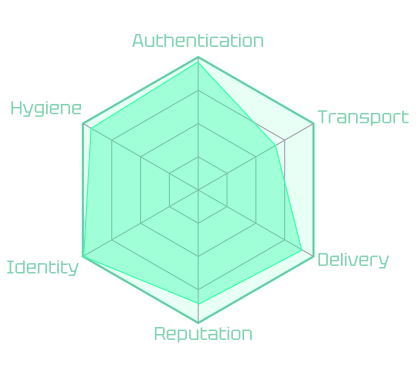
The scan groups its checks into six areas. Each area has a fixed weight in the overall score, so a broken DMARC record costs more than a missing BIMI logo.
✓ Authentication (45% of the score): SPF, DKIM and DMARC. Confirms each record exists and parses, counts SPF DNS lookups against the limit of 10, looks for DKIM keys under common selectors (and any you add) and checks their length, and reads your DMARC policy, subdomain policy and reporting addresses. Full detail for each record: SPF Checker, DKIM Checker, DMARC Checker.
✓ Transport (20%): MTA-STS, a TXT record plus a policy file served over HTTPS, which tells sending servers that support it to require TLS when delivering to your mail servers; and TLS-RPT, which asks them to report TLS failures. MTA-STS Checker
✓ Delivery (15%): MX records, name servers and reverse DNS (PTR) records. MX Checker, DNS Checker
✓ Reputation (10%): your domain on domain blocklists (URIBL), and your sending IPs on DNSBLs when the scan finds servers you run yourself. Shared IPs of providers such as Google Workspace or Microsoft 365 aren't assessed, and the report says so.
✓ Identity (5%): your BIMI record, logo and the mark certificate (VMC or CMC) behind it. BIMI Checker
✓ Hygiene (5%): duplicate or conflicting TXT records, deprecated tags and leftovers from old configurations. TXT Checker
The scan also checks DNSSEC for your domain and DANE (TLSA) records for your MX hosts, the same checks as the DNSSEC & DANE Checker. An area with nothing to assess, such as sending IPs on a domain that sends no mail, is shown as N/A.
How the Email Security Score and Spoofability Level Work
Email Security Score. Each area gets its own score from 0 to 100, and the overall score is their weighted average, shown with a grade:
• A+ (95–100) and A (85–94): strong protection
• B (70–84) and C (55–69): a working setup with gaps to fix
• D (40–54) and F (0–39): serious weaknesses that need attention now
Spoofability Level. The score covers your whole setup. Spoofability answers a narrower question: could someone send mail that passes as your domain? It is Low when the DMARC policy in effect is p=reject and Medium when it is p=quarantine. It is High when there is no valid DMARC record, the policy is p=none, or SPF ends in +all, which lets any server pass SPF for your domain.
The report lists the reasons behind your level. Fix the reason it names: publish or tighten DMARC if the record is missing or at p=none, or replace +all with the senders you actually use. What each DMARC policy does
How to Check Your Domain's Email Security
1. Enter your domain in the checker above, for example example.com.
2. Add details if you have them (optional). Add your DKIM selector if your email service uses a custom one; the checker already tries common selectors. Add the Return-Path domains of your email service providers, so SPF is checked on the domain receivers actually evaluate.
3. Read the report. It shows your score, grade and Spoofability Level, the top issues ranked by severity, a breakdown for each area and the raw DNS records found.
4. Fix and re-check. Work through the issues from the top, update your DNS, and run the check again to confirm the score went up.
The report URL contains the domain you checked, so you can send it to a colleague or to whoever manages your DNS.
Common Issues and How to Fix Them
• No DMARC record, or p=none: receivers get no instruction to act on mail that fails authentication. Publish p=none with a rua= reporting address, check in the reports that every legitimate sending service passes DMARC, fix the ones that fail, then move to quarantine and reject. How to set up DMARC
• p=quarantine instead of p=reject: receivers are asked to treat failing mail as suspicious rather than reject it. Move to p=reject only when your DMARC reports show all legitimate sources passing consistently; the DMARC Report Analyzer reads a single XML report.
• DMARC without a rua= address: the policy works, but no reports reach you, so you can't see who sends mail as your domain. How to read DMARC reports
• SPF permerror: two SPF records, or a record that needs more than 10 DNS lookups, cause SPF permerror. Multiple SPF records, too many DNS lookups
• No DKIM key found: the scan only tries common selectors and the ones you add, so this may mean your service uses another selector, not that your mail is unsigned. Open a message you sent, find the DKIM-Signature header, and add its s= value (the selector for the d= domain) to the scan. DKIM authentication failed
• Weak DKIM key: a 1024-bit RSA key should be rotated to 2048 bits.
• No MTA-STS: sending servers that support MTA-STS can't be told to require TLS for your mail servers. A working setup needs the _mta-sts TXT record and a policy file at https://mta-sts.yourdomain/.well-known/mta-sts.txt; mode: enforce makes it binding. MTA-STS Checker
• No TLS-RPT: you get no reports when sending servers fail to establish TLS with your mail servers.
• BIMI record but no logo: Gmail shows a logo only with DMARC at quarantine or reject, pct=100 and a valid mark certificate. BIMI Checker
• Parked domain without protection: a domain that sends no mail should still publish v=spf1 -all and a DMARC policy of p=reject, so nobody can send as it. Parked domains
Why Email Domain Security Matters
Many domains still leave room for spoofing. In our October 2026 DNS snapshot of the Tranco top 100,000, among the 72,645 domains that publish a non-null MX record:
• 24.0% had no DMARC record
• 27.9% published p=none, which asks receivers to take no action on mail that fails DMARC
• 47.9% published a quarantine or reject policy
Of the 70,338 domains with a single SPF record, 2,011 (2.9%) needed more than 10 DNS lookups to evaluate a sender the record doesn't list. Of the 2,655 BIMI mark certificates we could download, 433 (16.3%) had expired.
Mailbox providers act on these gaps. Gmail and Outlook.com require SPF, DKIM and DMARC from domains sending more than 5,000 messages a day to their personal mailboxes, and Yahoo has bulk sender rules of its own. When a domain falls short, the bounce says why: Gmail 550 5.7.26, Outlook.com 550 5.7.1, Yahoo 550 5.7.9. For how the three protocols work together, see SPF vs DKIM vs DMARC.
One-Time Check vs Continuous Monitoring
This checker reads your DNS at one moment. It can't show which services send mail as your domain or whether that mail passes DMARC. DMARC aggregate reports show that, for the receivers that send them to the rua= address in your record.
DMARKOFF reads those reports for you. It shows the sending sources observed in DMARC reports from participating receivers, alerts you when a record changes or a source starts failing, and helps you move to p=reject without blocking legitimate mail. Try the free DMARC Report Analyzer on a single XML report, or start a 14-day free trial to monitor your domains continuously.
FAQ
An email security checker audits a domain's email setup: the DNS records and policies that receiving servers use to decide whether to trust mail from that domain. DMARKOFF's free checker tests SPF, DKIM, DMARC, MTA-STS, TLS-RPT, MX, reverse DNS, DNSSEC, BIMI and blocklists in one scan, then returns an Email Security Score, a Spoofability Level and a list of issues with recommended fixes.
Yes. It's free, needs no signup and works on any domain, including your clients' domains if you manage email for others. The report URL contains the domain you checked, so you can share the result with your team or your DNS provider.
Enter a domain name. The checker looks up the domain's DNS records live, fetches the files those records point to (the MTA-STS policy and the BIMI logo and certificate), queries DNS-based blocklists, and runs each result through its checks. Each issue lowers the score of its area, and the six area scores combine into your Email Security Score.
The Email Security Score (0-100) is a weighted average of six areas: Authentication 45%, Transport 20%, Delivery 15%, Reputation 10%, Identity 5% and Hygiene 5%. The score maps to a grade:
- A+ (95-100): Excellent email security posture.
- A (85-94): Strong protection with minor improvements possible.
- B (70-84): Good setup, but some areas need attention.
- C (55-69): Several security or configuration issues were detected.
- D (40-54): Significant weaknesses affecting protection.
- F (0-39): Critical issues requiring immediate attention.
A high score doesn't guarantee inbox placement. It means your domain's configuration gives receivers fewer reasons to distrust your mail.
The Spoofability Level shows how easily someone could send mail that passes as your domain. It follows the DMARC policy that is actually in effect:
- Low: the policy in effect is
p=reject, which asks receivers to reject mail that fails DMARC. - Medium: the policy in effect is
p=quarantine, which asks receivers to treat failing mail as suspicious, usually by sending it to spam. Ap=rejectrecord in test mode (t=y) is applied as quarantine. - High: there is no valid DMARC record, the policy is
p=none, or SPF ends in+all, which lets any server pass SPF for your domain. - Unknown: the records couldn't be checked, for example because of a DNS error.
The report lists every reason behind your level, so fix the one it names. Receivers make the final delivery decision; the policy is a request to them.
Enter your domain in the Email Security Checker above and run the scan. Start with the Spoofability Level and the reasons listed under it, and fix the one that applies, such as a missing DMARC record or an SPF record ending in +all. Before you tighten DMARC to quarantine or reject, check in your DMARC reports that every legitimate sending service passes. Then work through the remaining issues, update your DNS records, and run the check again.
No. The Email Security Checker tests a domain's configuration (DNS records, policies and blocklists), not a single mailbox or email address. To find out whether an address appeared in a data breach, use a breach notification service, and turn on two-factor authentication with your email provider. To judge a suspicious message, see how to identify a phishing link.
No. It only reads public information: your DNS records, DNS-based blocklists and the files your records point to, such as the MTA-STS policy and the BIMI logo. It doesn't send email and doesn't need access to your DNS provider or mailbox.
Your email infrastructure changes. Adding an email service, moving to a new DNS provider or letting a certificate expire can quietly lower your protection and deliverability. Regular checks catch these issues early and reduce the risk of spoofing and phishing in your name. For continuous checks, DMARKOFF monitors your records and DMARC reports and alerts you when something changes.