Parked Domains: Uses, Risks, and Best Practices



A parked domain is a registered domain that doesn't host an active website. It usually shows a registrar placeholder, a "coming soon" page, ads, or a for-sale notice. Some parked domains still receive or forward email, so check how yours is used before you change its DNS. If it never sends email, SPF and DMARC records help mailbox providers reject messages forged in its name. If it never receives email either, add a null MX.
This guide covers what parking means, the risks that matter, the DNS records with values you can copy, and how to check a domain you already own. If you only want the check, run the Email Security Checker: it reads SPF, DMARC, MX, and DKIM for any domain, free and without signup.
Key Takeaways
- Parked means registered but unused. The domain has no site of its own, but it's still yours to renew and protect. Whether it sends or receives mail is a separate question.
- Email spoofing is the biggest risk. Without records that say the domain sends no mail, receiving servers have no basis to reject mail forged in its name.
- SPF and DMARC do most of the work:
v=spf1 -all, and DMARCp=rejectwith aruareport address. Add a null MX (MX 0 .) if the domain receives no mail, and remove DKIM keys left from old providers. - Reports tell you when someone tries. In our October 2026 scan of the Tranco top 100,000, 619 of the 2,094 domains with this setup published no report address.
- DMARKOFF holds parked domains for free: up to 10 without a plan, with an alert when a report shows mail sent as one.
What Is a Parked Domain?
A parked domain is registered with a registrar but isn't connected to a website, an app, or a mailbox. Its DNS points at the registrar's or a parking service's servers, which show a placeholder page to anyone who opens it. The owner keeps full control and can build a site on it, redirect it, or sell it at any time.
Depending on the setup, a visitor sees:
- the registrar's "This domain is parked" or "coming soon" page;
- a page of pay-per-click ads;
- a "domain for sale" page with a price or a contact form;
- a redirect to another site, or nothing at all.
A parked domain is not an expired one. An expired domain has lapsed, and anyone can register it once the registry releases it. A parked domain is still registered and renewed by its owner. Parking describes the website, not the mail: a parked domain may still forward mail to another inbox, or have an old newsletter tool sending in its name. The email advice below is for domains that send no mail.
What Does "This Domain Is Parked" Mean?
The owner registered the name but hasn't built a site yet, so the registrar shows a placeholder. Nothing is wrong with your browser or your connection. If you expected a company's website, check the spelling of the address: typo domains are often parked with ads, and some later switch to fake login pages. Don't enter a password or payment details on a parked page. What is a phishing link shows how to spot one.
Why Do Companies Park Domains?
Most parked domains exist to hold a name, not to serve anything:
- Future projects: a product or campaign name registered before launch.
- Brand protection: misspellings, other extensions such as .net or .co, and country domains, so that nobody else can register them.
- Old brands: names left after a rebrand or an acquisition that customers still recognize.
- Resale: domain investors park names until a buyer appears.
- Redirects: variants that send visitors to the main site. Strictly speaking, a redirecting domain isn't parked, but it usually sends no mail either, so the email advice below applies to it too.
A company that owns examplebrand.com might also hold examplebrand.net, exampelbrand.com, and getexamplebrand.com. None of them needs a website. All of them need the records below, because each one looks like the real brand in a From address.
What Are the Risks of a Parked Domain?
The biggest risk is email spoofing. Email lets any server put any domain in the From address, and the receiving server decides whether to trust the message by checking SPF, DKIM, and DMARC. A parked domain that publishes none of them gives receivers no reason to reject a forged message, and a brand variant like examplebrand.net looks trustworthy to the people who get it. The other risks come from neglect: an expired registration, stale DNS records, and low-quality ad pages.
Email Spoofing and Phishing
Attackers send fake invoices, password resets, and support messages from domains that look like yours. On a domain that never sends mail, every message claiming to come from it is forged. That makes the defense simple: say so in DNS, and receivers that check DMARC can reject the mail. What is DMARC explains the check they run. These records protect only the domains you own. A lookalike that someone else registers needs monitoring and a takedown request instead.
Expiry and Takeover
If a parked domain lapses, anyone can register it once the registry releases it. The new owner gets its old links, its search history, and any mail still sent to its old addresses. Turn on auto-renew and registrar lock for every domain you keep.
Stale DNS Records
A CNAME left pointing at a deleted cloud resource lets someone else claim that resource and serve pages on your subdomain. Old TXT verification records and DKIM keys from a former provider stay usable until you remove them. Review the records of parked domains at least once a year.
Ad Parking Pages
Registrar parking pages often show ads, sometimes for competitors or for worse. On a brand variant, they tell customers that the brand is careless or gone. Redirect brand variants to your main site, or show a plain page with no ads.
How Do You Protect a Parked Domain From Email Spoofing?
Publish DNS records that say the domain sends no mail: SPF and DMARC for outgoing mail, a null MX if it receives none, and no DKIM keys left from old providers. Receivers that check DMARC can then reject mail sent in its name, and the DMARC report address tells you when someone tries. Microsoft documents the same SPF record for parked domains, and the UK government's guidance recommends all four records below for domains that don't send email.
First confirm that the domain doesn't send email. For every tool that might, such as an old newsletter service, a billing system, or a contact form on a forgotten site, check three things: the From address, the Return-Path (bounce) domain, and the domain in its DKIM signatures. Mail sent from a subdomain can still use the main domain as its Return-Path. Then check incoming mail: MX records, aliases, and forwarding. Many registrars forward mail for parked domains, such as info@ to your own inbox, and a null MX stops that. If you can't rule out a sender, publish only the DMARC record first, as described below the table.
Replace <report address> with an address on a domain that accepts mail: a domain with a null MX can't receive its own reports. If the address is on another domain, that domain has to publish a record that authorizes reports about yours (RFC 9990, section 4), or providers won't send them. DMARKOFF gives you a report address for free when you add the domain as parked, and that address is already authorized.
Not sure that nothing sends as the domain? Publish only the DMARC record, with p=none and the rua address, and read the reports for at least a month, so that rare senders such as monthly billing show up. Reports come only from providers that send them, so compare what they show with the senders you know about. Hold off on SPF and the null MX until then: -all and a null MX can bounce real mail on their own, whatever the DMARC policy says. In our test of 20 mailbox providers, Onet and Interia refused DKIM-signed -all mail at the RCPT TO step, before the message and its signature were sent, and a refusal that early never shows up in DMARC reports. When the reports show no mail you want to keep, add the other records and switch to p=reject.
DMARC: p=reject With a Report Address
DMARC checks that SPF or DKIM passes for a domain aligned with the visible From address. On a domain that sends no mail nothing can pass, so p=reject asks receivers to refuse every message in its name. It's a request: RFC 9989 tells receivers not to reject on the policy alone. In our test, Gmail, Yahoo, and Outlook.com refused such mail, several providers put it in spam, and T-Online and Vodafone delivered it to the inbox. DMARC policies explains none, quarantine, and reject.
sp=reject applies the policy to subdomains that have no DMARC record of their own, so check them too before you publish. A subdomain's own record takes precedence, and the np tag for subdomains that don't exist falls back to sp when you leave it out (RFC 9989, section 4.7). Our guide to the sp and np tags covers both. If no subdomain sends mail either, you can add adkim=s; aspf=s, as GOV.UK does, so that a signature or Return-Path on a subdomain no longer passes for the main domain.
The rua tag tells mailbox providers where to send aggregate reports. The reports show mail that the providers who send them saw with the domain in the From address, which is the routine way to learn that someone uses it. In our scan of the Tranco top 100,000 on 27 October 2026, 2,094 of the 99,441 domains we analyzed published v=spf1 -all and p=reject with no mail server in MX: 1,859 had no MX record and 235 a null MX. 619 of them, 29.6%, had no rua tag, so providers had nowhere to report mail sent as them.
SPF: v=spf1 -all
SPF lists the servers allowed to send mail for a domain. A record that lists no servers and ends in -all says that none is, so any message that uses the domain as its envelope sender (the Return-Path) fails SPF (RFC 7208, section 5.1). SPF covers only the name it's published on, not its subdomains. It doesn't check the From address people see either, so on its own it doesn't stop a forged From. That's DMARC's job. If the domain already has an SPF record, replace it: two SPF records make SPF fail with a permerror. SPF record syntax covers the all qualifiers.
Null MX
A null MX is an MX record with priority 0 and a single dot as the host: MX 0 .. It tells other servers that the domain accepts no mail, so mail sent to it fails at once instead of waiting in queues (RFC 7505). Use it only when the domain receives no mail, including aliases and forwarding. It must be the domain's only MX record, so delete any others first, including the ones a registrar adds for mail forwarding (RFC 7505, section 3). The dot matters: an MX record whose host is @ or the domain name points mail at the domain itself. Some DNS hosts can't create a null MX. If yours can't, publish no MX record at all: senders then try the domain's A or AAAA record, and how long the mail waits before it bounces depends on the sender.
A null MX doesn't stop spoofing on its own. It is about incoming mail: some receivers refuse mail from a domain with a null MX, but only DMARC tells them what to do with a forged From address. Of the 412 domains with a null MX in the same scan, 21.8% published no DMARC record.
DKIM: Remove Old Selectors
If the domain once sent mail, delete the selector records (TXT or CNAME) left from former email providers, so that no old key can verify a signature in its name. You can also publish an empty key at *._domainkey, as GOV.UK recommends. A DKIM record with an empty p= tag revokes the key (RFC 6376, section 3.6.1), and the wildcard answers for every selector that has no record of its own. The record is optional: DMARC already fails without a valid signature, so it states the intent rather than adding a new block. A wildcard never overrides a selector name that exists, which is why the old records have to go.
How the Checker Reads example.com
example.com, the domain reserved for use in documentation, publishes all four records. When we ran it through our Email Security Checker in November 2026, it scored 94 out of 100, grade A. The checker found the empty DKIM key at *._domainkey without being given a selector, and didn't expect a working key, because the SPF record authorizes no senders. It didn't ask for MTA-STS or TLS reporting either, because the null MX says the domain takes no mail. Its one warning: the DMARC record has no rua address.
Check Your Domain
Keep Parked Domains in DMARKOFF for Free
DMARKOFF reads the DMARC reports that mailbox providers send about your domains. A domain added with the Parked status costs nothing:
- Free with or without a plan. Signup needs no credit card and starts a 14-day trial. Parked domains don't use the trial's domain slot, and they stay parked and free when the trial ends. Without a plan, an account can hold up to 10 parked domains across its projects. Paid plans have no limit.
- An alert when someone sends as it. When DMARKOFF receives a report showing mail that used a parked domain, it alerts you, at most once a day per domain. A parked domain gets this alert and one processed report a day, not the full reports of a monitored domain. To read every report during a
p=nonecheck, add the domain as a regular one on the trial and park it once you switch top=reject. - Room to change your mind. If the domain starts sending mail on purpose, unpark it. It then takes a domain slot on your plan and gets full reports.
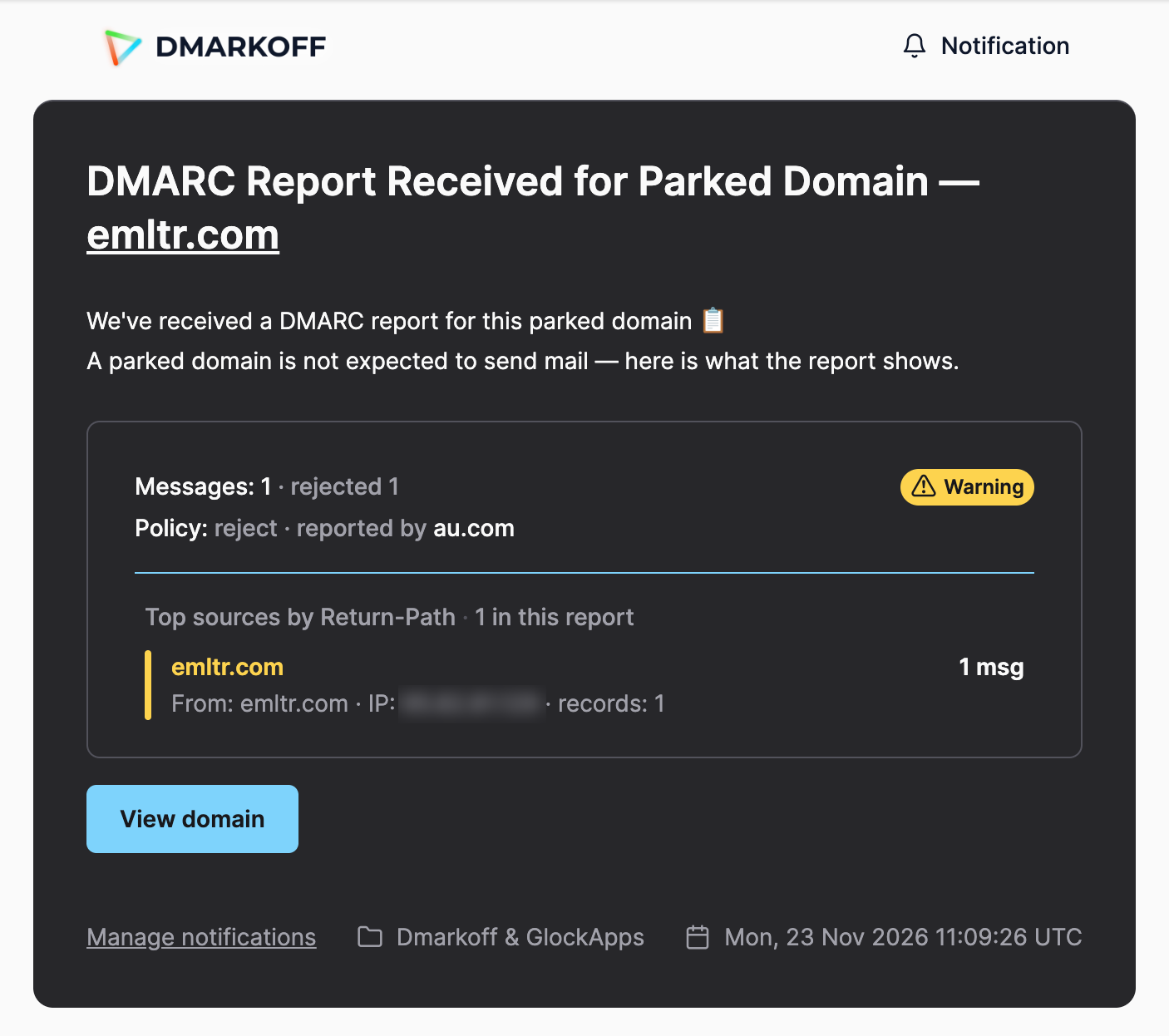
The alert for emltr.com, a GlockApps domain parked in DMARKOFF: au.com rejected one message sent in its name under p=reject. Sender IP blurred.
To add one, sign up, choose Add domain, and tick Add domains with "Parked" status. On the Configure DMARC step, choose Reject: it starts at None when the domain has no DMARC record yet. Then publish the record DMARKOFF gives you. With Add domain list, DMARKOFF shows only the report address, so put it in the rua tag of the record from the table above. After the trial, or on an account without a plan, the Parked box is already ticked.
Add Parked Domains Free
Parked Domain Checklist
The email records let receivers reject forged mail. The rest of the work keeps the domain yours:
- Keep one inventory of every domain, with its owner, registrar, renewal date, and purpose.
- Turn on auto-renew and registrar lock, and protect the registrar account with two-factor authentication.
- On every domain that sends no mail, publish SPF and DMARC with a
ruaaddress that someone reads, and add a null MX if it receives none. - Redirect brand variants to your main site instead of leaving them on ad pages.
- Remove CNAME, TXT, and DKIM records that point at services you no longer use.
- Watch for lookalike domains that others register: your records don't cover them.
- Check each parked domain again after DNS changes or a registrar move.
Check Your Parked Domain
Enter a domain below to check its SPF, DMARC, and MX records the way a receiving server reads them. Without a selector, the checker tries common DKIM selectors and finds an empty wildcard key. If you know a selector, enter it under Advanced options. The checker recognizes a domain that sends no mail: it doesn't ask for a DKIM key when SPF authorizes no senders, and it warns when DMARC has no rua address. The check is free and needs no signup.
FAQ
Yes. Attackers can put it in the From address of forged mail, and a parked page on a typo domain can later be replaced with a fake login page. Records that say the domain sends no mail let receiving servers reject the forged mail.
Yes. DMARC is the record that asks receiving servers to reject mail that uses the domain in the visible From address. Use p=reject with a rua address, so that mailbox providers send you reports when someone tries.
It doesn't need a working key. Remove selector records left from old providers, so that no old key can sign in its name. An empty key at *._domainkey is optional: it makes the intent explicit, and DMARC already fails without a valid signature.
A parked domain is a state: registered but not in use for a website. A null MX is one DNS record that says the domain accepts no mail. A parked domain that receives no mail needs a null MX in addition to SPF and DMARC.
Not by themselves: parking a separate domain doesn't count against your main site. A parked page has little content, so it rarely ranks. For a brand variant, a 301 redirect to the main site is the cleaner choice.
Through DMARC aggregate reports. Publish a rua address, and mailbox providers that send DMARC reports list the sources that sent them mail as the domain. DMARKOFF reads them and alerts you when a report shows mail sent as a parked domain.

The author has several years of experience creating high-quality content, with a strong focus on clear structure, readability, and truly meaningful insights.
She specializes in topics related to email authentication, deliverability, marketing technology, and digital communication.